
 Use cases
 Messaging
 Taxi Companies
 Private Transport
 Transportation Entrepreneurs
 Last Mile
 SuperApp
 Software
 Taxi dispatch
 Corporate transportation
 Auction
 Products
 Booking Software
 Dispatch Platform
 Driver App
 Passenger App
 Web Widget
 Functions
 Schedule & Booking
 Driver Management
 Custom
 Corporate Portal
 Security & Support
 Resources
 Learn
Learn



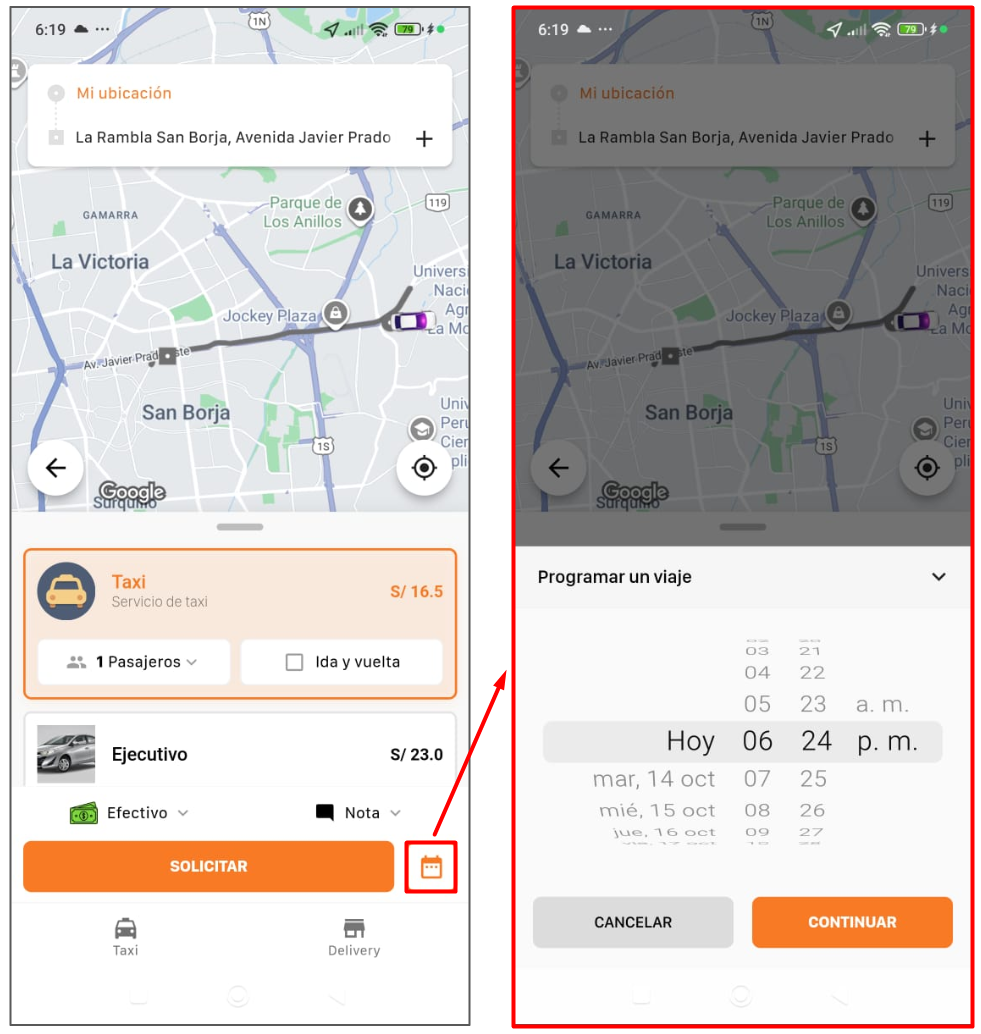
Schedule a trip for a different date
After choosing the origin and destination, you'll see the REQUEST button and another button with a calendar icon, where you can schedule a trip for a different date and time.
Was this article helpful?
Getting Started
- Customer: sign up / log in
- Requesting a Trip from the App
- Requesting an instant or scheduled trip
- Reviewing trips (history and scheduled)
- Schedule a trip for a different date