
 Use cases
 Messaging
 Taxi Companies
 Private Transport
 Transportation Entrepreneurs
 Last Mile
 SuperApp
 Software
 Taxi dispatch
 Corporate transportation
 Auction
 Products
 Booking Software
 Dispatch Platform
 Driver App
 Passenger App
 Web Widget
 Functions
 Schedule & Booking
 Driver Management
 Custom
 Corporate Portal
 Security & Support
 Resources
 Learn
Learn



Service or Trip History Report
The Service Report lets you view every trip that was completed, canceled, or voided in the system.
To export it, go to Trip History and click the ellipsis icon.
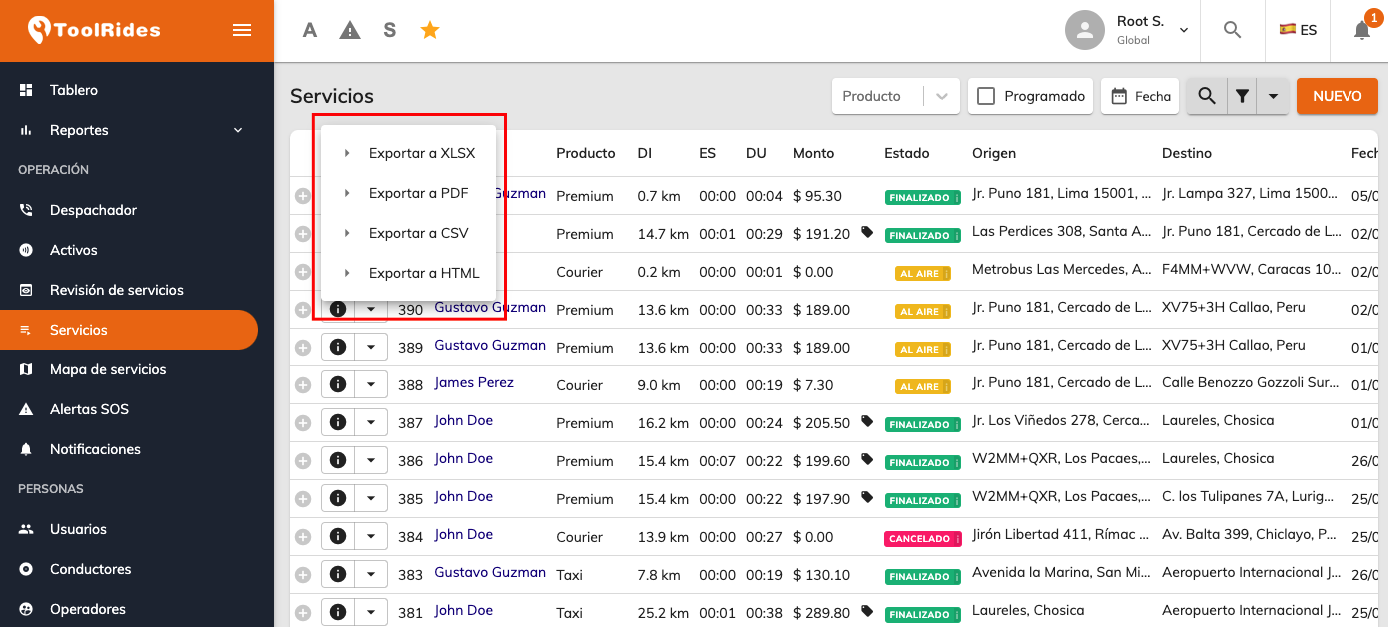
Once exported, the file will include all the fields related to the trip:

Here's a breakdown of each field:
General service fields:
Service Code: Unique identifier for the service.
Branch: Location or operating unit where the service was logged.
Status: Current status of the service (e.g., Completed, Canceled, Voided).
Request type: Scheduled or Immediate.
Request Date / Request Time: Date and time the service was requested.
Scheduled Date / Scheduled Time: Date and time the service was scheduled for.
Arrival Date / Arrival Time: Date and time the driver arrived at the pickup point.
Start Date / Start Time: Date and time the service started (start of the trip).
End Date / End Time: Date and time the service ended (end of the trip).
# of Intermediate Stops: Number of stops recorded between the start and the destination.
Requester and creation details:
Requester Name: The person who requested the service (Corporate User).
Created by: The system user or operator who created the service.
User ID: Internal identifier of the requesting user.
User Name / User Email / User ID Number: Details of the user the service was requested for.
Guest Name / Guest Phone: Contact information for a guest passenger who isn't registered in the system.
User Code: The company's internal code used to identify the user.
Approver: The person who validated or authorized the service (if applicable).
Driver and vehicle details:
Driver (ID): Internal identifier of the driver.
Driver (Name): The driver's full name.
Stars: Rating given to the driver.
License Plate: Plate of the vehicle assigned to the service.
Commercial and administrative details:
Payment method: How the service was paid for (e.g., cash, card, corporate).
Product: Type of service provided (e.g., Standard Transfer, Van, Courier).
Company / Area / Cost Center: Billing details or how the service is charged within an organization.
Origin point details (1):
District 1 / Address 1 / Name 1 / Phone 1 / Email 1: Information about the pickup point.
Base Fare 1 / Toll 1 / Parking 1 / Wait Charge 1 / Wait Time 1 / Courier 1 / Total 1: Costs associated with the origin point (base fare, toll, parking, waiting, and courier).
Destination point details (2):
District 2 / Address 2 / Name 2 / Phone 2 / Email 2: Information about the drop-off point.
Base Fare 2 / Toll 2 / Parking 2 / Wait Charge 2 / Wait Time 2 / Courier 2 / Total 2: Costs associated with the destination.
Totals and costs:
Base Total: Base price of the service without add-ons.
Total Waiting / Toll / Parking / Courier / Surge: Specific additional charges.
Total Wait Time / Total Duration: Waiting time and total duration of the service.
Total Price / Total Due: Gross price and final amount the customer must pay.
Service fee: Commission deducted from the driver on top of the standard commission (if applicable).
Taxes: Total amount of taxes (if applicable).
Cost: Amount paid to the driver.
Passengers: Number of passengers who used the service.
Distance Traveled (KM): Total distance covered during the service.
Instructions: Special instructions for the service.
Was this article helpful?
Reports
- Revenue Summary report
- Service or Trip History Report
- Activity report