
 Use cases
 Messaging
 Taxi Companies
 Private Transport
 Transportation Entrepreneurs
 Last Mile
 SuperApp
 Software
 Taxi dispatch
 Corporate transportation
 Auction
 Products
 Booking Software
 Dispatch Platform
 Driver App
 Passenger App
 Web Widget
 Functions
 Schedule & Booking
 Driver Management
 Custom
 Corporate Portal
 Security & Support
 Resources
 Learn
Learn



Configure your time settings in the panel
The web panel gives you several ways to configure the different time settings for a trip.
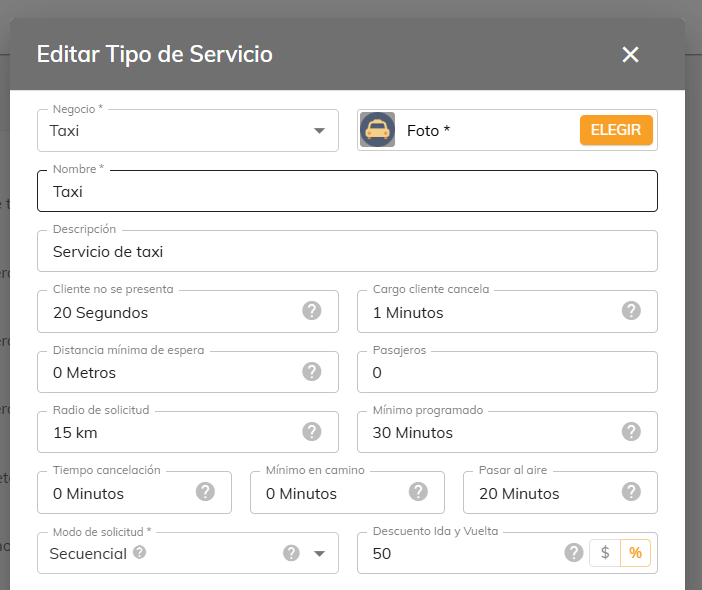
No-show: The amount of time the driver has to tap the button indicating that the customer didn't show up. When set to 0, the button is disabled.
Customer cancellation charge: Once this time elapses, the customer is charged for canceling the service.
Cancellation window: How far in advance the customer can cancel the service. If set to 0, no restriction applies.
Minimum advance booking: How many minutes ahead of time the customer must book a service.
Minimum lead time en route: The minimum time for the driver to head out to pick up the passenger on a scheduled service. If set to 0, no restriction applies.
Go live: Determines when pending services automatically switch to "live" status. If set to 0, services stay pending.
You'll find these settings under Maintenance > Settings > Company > Service Types. Edit a service type and a window like the one shown below will open.
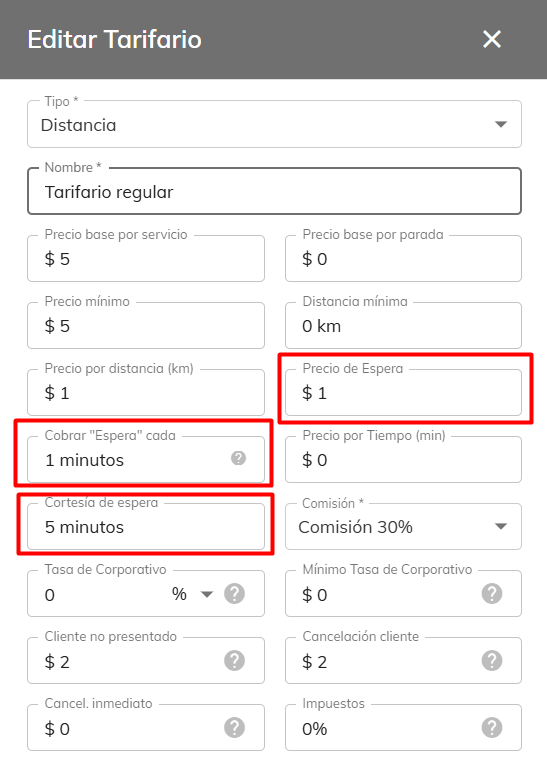
Wait grace period: The grace period given to the customer to board the vehicle before wait time starts being charged.
Charge "Wait" every: How often the wait price is charged once the grace period has passed.
Wait price: The amount charged per minute after the grace period. This is also the same per-minute amount charged whenever the driver puts the trip on pause.
Was this article helpful?
Getting Started
- General Settings
- Customize your company information
- Create branches and assign rate tables by service type and company
- Setting up a distance-based fare (price per KM)
- Tolls (Tags): Setting Up Zones and Pricing
- Setting up zone-based pricing
- Setting up service types
- Trip grouping settings
- Configure your time settings in the panel