
 Use cases
 Messaging
 Taxi Companies
 Private Transport
 Transportation Entrepreneurs
 Last Mile
 SuperApp
 Software
 Taxi dispatch
 Corporate transportation
 Auction
 Products
 Booking Software
 Dispatch Platform
 Driver App
 Passenger App
 Web Widget
 Functions
 Schedule & Booking
 Driver Management
 Custom
 Corporate Portal
 Security & Support
 Resources
 Learn
Learn



General Settings
From the screen below, you can make the first customizations to your platform so it fits the needs of your business.
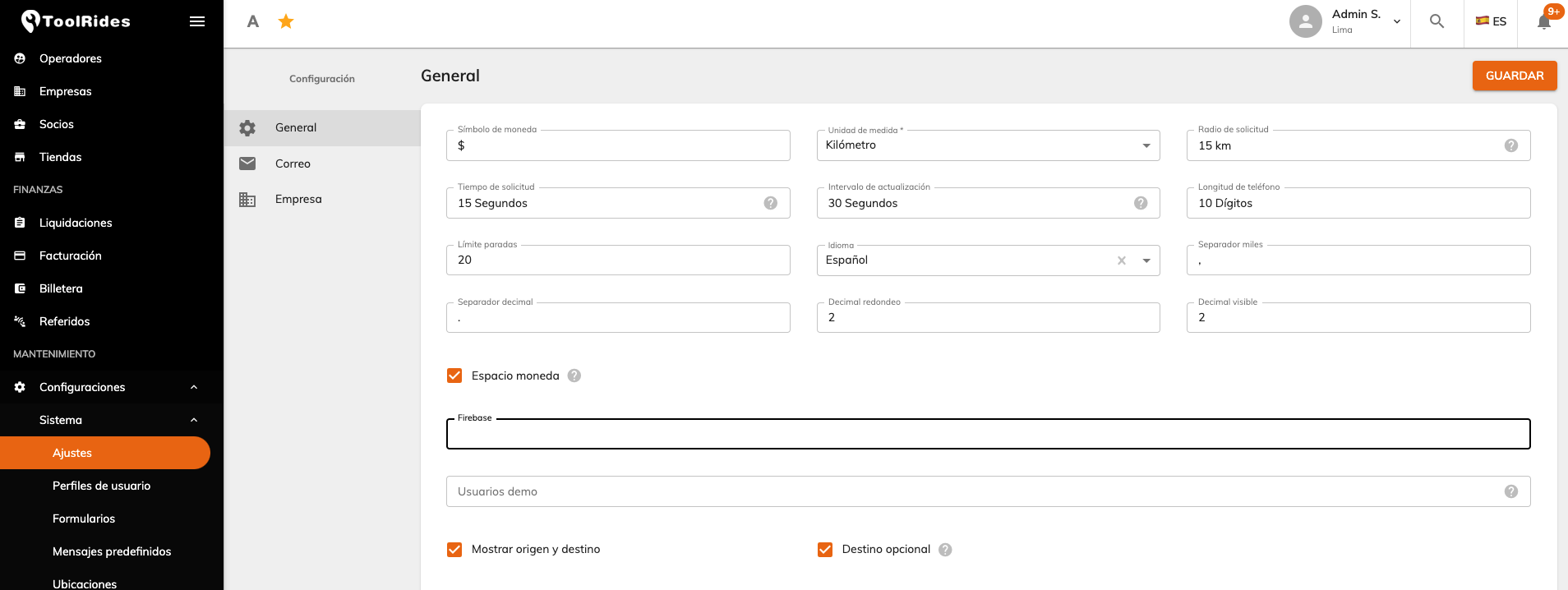
Go to the side menu Settings > System > Preferences, where you'll be able to customize:
- Currency symbol: shown across all configured prices.
- Unit of measure: kilometers or miles.
- Request radius: the radius used to automatically search for drivers when a ride is requested.
- Request time: how long the ride alert stays active in the driver app; once this time is up, the alert closes.
- Refresh interval: how often the Active Services and Dispatcher submodules are refreshed.
- Phone length: sets a character limit for the phone field.
- Stop limit: limits the number of stops allowed when creating a ride.
- Language: the default language the platform will run in.
- Thousands separator: the symbol used to separate thousands.
- Decimal separator: the symbol used to separate decimals.
- Rounding decimals: field to round prices to a number of decimals.
- Visible decimals: field to set how many decimals are shown.
- Currency spacing: indicates whether the currency symbol has a space between it and the price.
- Show origin and destination: when enabled, the driver sees the origin and destination in an alert when a ride is requested.
- Optional destination: when enabled, a passenger requesting a ride can enter only the pickup point.
Was this article helpful?
Getting Started
- General Settings
- Customize your company information
- Create branches and assign rate tables by service type and company
- Setting up a distance-based fare (price per KM)
- Tolls (Tags): Setting Up Zones and Pricing
- Setting up zone-based pricing
- Setting up service types
- Trip grouping settings
- Configure your time settings in the panel